


 vExpiryExpiry tracking for documents, groceries, medicines, and subscriptions with reminders, attachments, and local backup on iOS and Android.


BoMoSi product
Organise and TrackContact Manager & Tools for Web Messenger
Export WhatsApp Web contacts, protect your screen, and analyse chats in Chrome.
Chrome extension for WhatsApp Web — export contacts, privacy mode, AI writing help, chat analysis, and quick chat links.
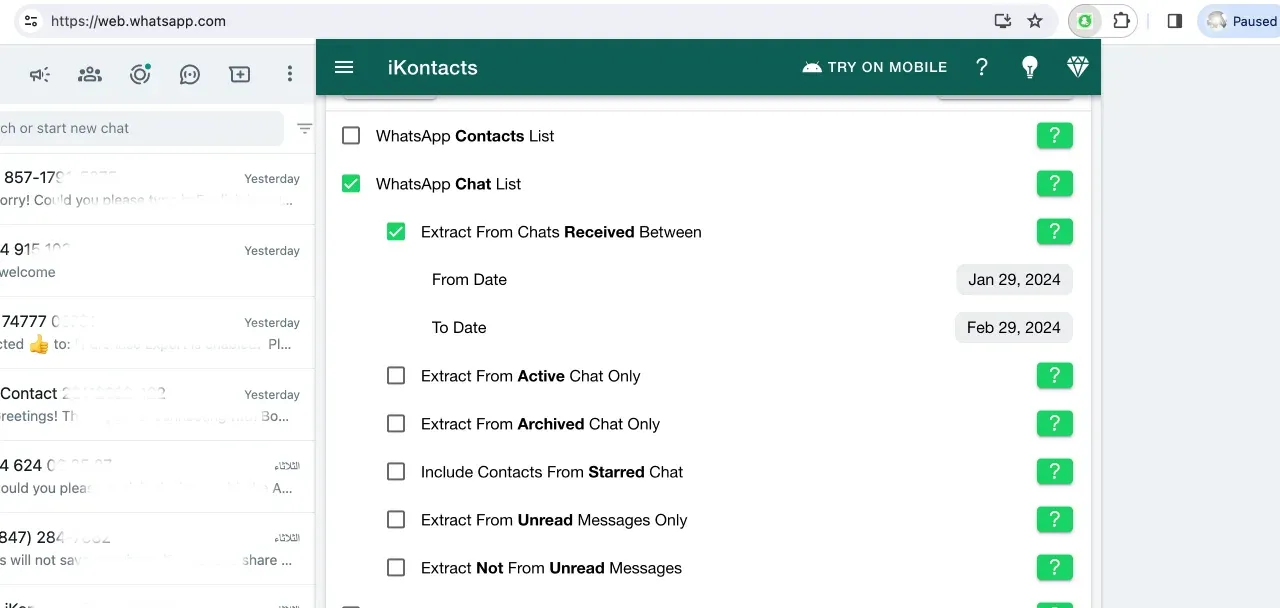
WhatsApp Web is where work happens, but contacts stay hard to export, screens are easy to overshare, and chat insights require manual digging.
iKontacts adds contact export, privacy controls, optional AI writing help, local chat analysis, and link/QR tools directly in Chrome while you use WhatsApp Web.
Export WhatsApp contacts from chats, groups, labeled contacts, and blocked lists to Excel, CSV, vCard, JSON, or text.
Identify and export unsaved contacts, with generated names for unknown numbers when needed.
Blur chat messages, names, phone numbers, profile pictures, previews, and media while using WhatsApp Web.
Quick hide or blur during meetings and screen shares, plus auto lock or blur after inactivity.
Rewrite, fix grammar, translate, summarise, or adjust tone when you choose to run an AI action.
Analyse exported chat files for message counts, timelines, and participant activity.
Start chats without saving a number, and generate WhatsApp links or QR codes with prefilled messages.
iKontacts is for people who live in WhatsApp Web for work — exporting numbers, protecting the screen on shared displays, and pulling light insights from chat files. Install the extension, connect WhatsApp Web, then use export and privacy tools as needed.
It is independent software. WhatsApp trademarks belong to their owners; review store permissions before installing in a work browser profile.
Note. iKontacts is an independent extension and is not associated with WhatsApp. It does not interfere with WhatsApp Web functionality. All trademarks belong to their respective owners.
Install it from the Chrome Web Store, then use it while signed into WhatsApp Web in Chrome.
No. iKontacts is a Google Chrome extension for WhatsApp Web.
No. AI writing tools run only when you trigger them.
Download from the stores where this product is available. Store availability matches the platforms listed above — we do not invent listings.
vExpiryExpiry tracking for documents, groceries, medicines, and subscriptions with reminders, attachments, and local backup on iOS and Android. ContactMindOn-device contact cleanup with a health score, review queue, import/export, backups, and business-card scanning for iPhone.
 BizobixEnterprise natural-language analytics for SQL Server and Oracle with governed access — queries run locally so database records never leave your network.